
X555 Customer Support – Get Help With Account, Login, and Payment Issues
X555 Customer Support is available for users who need help with account access, verification, technical errors, payment-related questions, or general platform guidance. Whether you are unable to log in, waiting for an OTP, facing an app issue, or unsure about a promotion, the support section can help you understand the next step. Using the official help option is always safer than relying on messages from unknown people on social media.
New users often face small problems because they are not familiar with the app layout or account settings. Most issues can be solved by checking your details, updating the application, or contacting the correct support channel. This page explains how to reach the help team, what details to provide, and how to protect your personal information while asking for assistance.
What Can the Support Team Help You With?
The customer service section is designed to guide users through common account and platform-related problems. Before contacting support, it is useful to identify the exact issue you are facing. A clear explanation can help the team understand your concern more quickly and provide a more relevant response.
You may contact support for help with:
- Login or password recovery problems
- OTP and account verification issues
- Registration errors
- App installation or update problems
- Slow loading or technical glitches
- Deposit and withdrawal-related questions
- Promotion or bonus eligibility queries
- Profile information updates
- General platform guidance
- Suspicious activity in your account
Support can provide guidance, but users should always keep their own account details private. Never share your password, OTP, or recovery code with anyone, even if they claim to be an agent or support representative.
How to Contact X555 Customer Support?
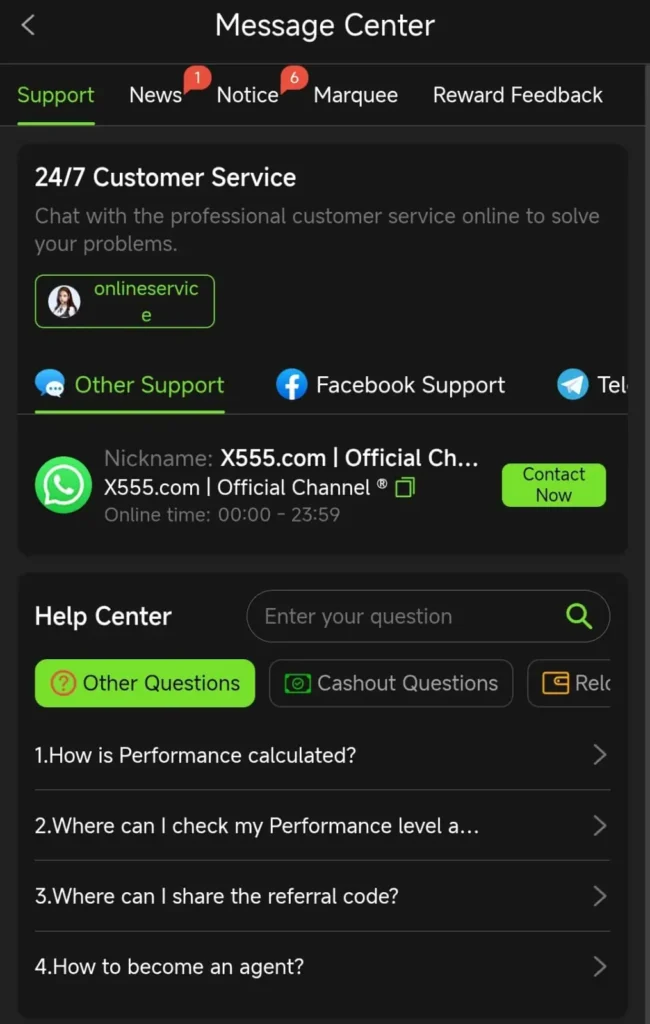
The easiest way to get help is usually through the official application. Most users can find the support option from the home screen, account menu, profile section, or settings area. The exact location may look different after an app update, but it is usually marked as Help, Support, Customer Service, Contact Us, or Live Chat.
Follow these steps to contact support through X555 App:
- Open the official X555 app on your device.
- Log in to your registered account.
- Open the profile, menu, or settings section.
- Look for Customer Support, Help Center, or Live Chat.
- Select the category related to your issue.
- Write a short and clear explanation.
- Add only the information needed to identify the problem.
- Wait for a reply through the official chat or support section.
Avoid sending several messages about the same issue within a few minutes. It is better to send one complete message with the correct details. This can help the support team understand the matter without asking the same questions repeatedly.
Reaching Help Through the Website
Users who access X555 Game through a browser may find the support option on the website homepage, footer, menu, or account area. The official website may offer a contact form, live chat option, FAQ page, or direct help button. Make sure you are on the correct website before entering any information.
When using browser support, keep these points in mind:
- Use an updated browser such as Chrome, Edge, Firefox, or Safari.
- Check that the website address is correct before signing in.
- Avoid opening support links received through unknown messages.
- Do not enter your password into a form that looks suspicious.
- Take a screenshot of the error if it is safe to do so.
- Refresh the page before contacting support for a loading issue.
If the support page does not open, clear your browser cache or try another updated browser. A weak internet connection can also stop the chat box or help form from loading correctly.
Information for Support to Understand Your Problem
A support request becomes easier when you provide the right information from the beginning. You do not need to share sensitive details, but basic account-related information can help the team locate the issue more quickly. Keep your message short, respectful, and focused on one problem at a time.
Helpful information may include:
| Detail to Share | Why It Helps |
|---|---|
| Registered mobile number or email | Helps identify the correct account |
| Type of issue | Shows whether it is a login, payment, or app problem |
| Date and approximate time | Helps check recent account activity |
| Screenshot of an error | Can show the exact message on screen |
| Device type | Helps with Android, iPhone, or PC-specific issues |
| App version or browser name | Useful for technical troubleshooting |
| Transaction reference, where applicable | Helps review payment-related concerns |
Never send your password, OTP, PIN, recovery code, or complete financial information in a support chat. Genuine support does not need your password to check a normal account issue. Keep this information private at all times.
Account Access and Password Recovery Help
Login issues are common, especially when users change devices, forget a password, or enter the wrong details several times. Before contacting customer support, check whether you are using the same mobile number or email address that was used during registration. Then make sure the password is entered correctly without extra spaces or typing errors.
If you cannot access the account, try these simple steps first:
- Use the Forgot Password option on the login screen.
- Enter your registered mobile number or email address.
- Request an OTP or reset link.
- Create a new secure password.
- Restart the app or browser before trying again.
- Check your network signal if the OTP does not arrive.
- Contact support if recovery still does not work.
Do not keep guessing your password repeatedly because this may temporarily limit access to your account. A password reset is usually a safer option when you are unsure of the correct details.
Help With Deposits and Withdrawals
Payment-related questions should always be handled carefully. Before contacting the X555 Customer Support team, check whether you entered the correct account details and whether your payment method is active. Some transactions may take time to update because of network delays, bank processing, or temporary maintenance.
When asking about a transaction, explain the issue clearly. Mention whether it is a deposit, withdrawal, pending request, failed transaction, or incorrect balance display. You may share the transaction reference if the official support channel asks for it, but never share your password or OTP.
Before submitting a payment-related request, check:
- The amount entered in the transaction.
- The selected payment method.
- Your account number or wallet details.
- The transaction date and approximate time.
- Whether the payment shows as pending or completed.
- Any message displayed after the request.
- The official transaction history in your account.
Avoid creating multiple withdrawal requests for the same amount if the first one is still pending. Repeated requests can create confusion and may delay the review process.
Technical Problems and App Errors
Sometimes the app may load slowly, close suddenly, show a blank screen, or fail to open. These issues can happen because of an outdated version, low phone storage, background apps, weak internet, or temporary maintenance. Try simple troubleshooting steps before contacting support.
You can try the following:
- Restart your phone or computer.
- Check your Wi-Fi or mobile data connection.
- Close unnecessary background applications.
- Update the X555 app to the latest available version.
- Clear the app cache from your phone settings.
- Check whether your device has enough free storage.
- Use an updated browser when accessing the website.
- Reinstall the app only from the official source if needed.
If the issue continues, take a screenshot of the error message and send it through the official help section. This can help the support team understand the problem more accurately.
How to Write a Clear Support Message
A well-written support message saves time for both you and the customer service team. Avoid sending only short phrases such as “help me” or “my account is not working.” Explain what happened, when it happened, and what you have already tried. This gives the support team useful context from the start.
A good message can include:
- Your registered mobile number or email address
- The exact problem you are facing
- The date and time when it started
- The device you are using
- Any error message shown on the screen
- The steps you already tried
- A safe screenshot, if necessary
For example, you can write: “I am unable to receive an OTP on my registered number. I checked my mobile signal and requested a new code twice, but it has not arrived.” This is much clearer than sending a vague message without details.
Stay Safe From Fake Support Contacts
Some people may pretend to be support agents through WhatsApp, Telegram, Facebook, or other social media platforms. They may offer quick account recovery, bonus activation, or payment help in exchange for private details. These messages can be risky and should be treated carefully.
Follow these safety rules:
- Use only the official app or website support option.
- Never share your password, OTP, or recovery code.
- Do not trust unknown people offering account help.
- Avoid clicking suspicious support links.
- Check the platform website before entering your details.
- Do not send private screenshots to random contacts.
- Report suspicious activity through the official support channel.
Your account security depends greatly on how you handle private information. Support may help with guidance, but your password and verification codes should always remain with you.
When You Should Contact Support Immediately
Some problems need quick attention, especially when they involve account security or unusual activity. If you notice a login from an unfamiliar device, a password change you did not request, or a transaction you do not recognize, contact official X555 Customer Support as soon as possible. Change your password immediately if you believe someone else may have accessed your account.
You should contact support quickly when:
- Your account shows unusual login activity.
- You receive an OTP that you did not request.
- Your registered number or email changes unexpectedly.
- A transaction appears that you do not recognize.
- Your account becomes locked without a clear reason.
- You receive suspicious messages claiming to be official support.
Do not ignore unusual activity, even if the account still appears to be working. Fast action can help reduce further problems and protect your information.
Frequently Asked Questions
How do I contact X555 Customer Support?
You can usually access help through the official app or website. Look for options such as Customer Support, Help Center, Live Chat, or Contact Us in the profile, menu, or settings section.
What details should I share with support?
You can share your registered mobile number or email, the issue type, device details, and a safe screenshot of the error. Never share your password, OTP, PIN, or recovery code.
What should I do if I do not receive an OTP?
Check your network signal, confirm that your registered number is active, and request another code after a short wait. Contact support if the problem continues.
Can support recover my account without my password?
Support may guide you through account recovery, but you should use the official Forgot Password process. Never give your password or OTP to anyone claiming to recover the account for you.
How can I report a suspicious message?
Do not reply to the message or share any details. Take a screenshot if needed and report it through the official support area inside the app or website.
Final Words
X555 Customer Support can help users handle common issues related to accounts, login access, verification, payments, promotions, and technical errors. The best way to get a useful response is to use the official help section, explain your problem clearly, and provide only safe account details. Small checks, such as updating the app or confirming your internet connection, can solve many issues without delay.
Keep your password, OTP, and recovery information private at all times. Use official support channels only, stay alert for fake contacts, and take quick action whenever you notice unusual account activity. A careful support request and good account security habits can make your overall experience more organized and safer.